Exploring Bitwarden Secrets Manager (BWS) for developers: setup, workflow integration, and managing secrets across projects. The objective is to create an alias that automatically retrieves and sets project-specific secrets as environment variables when switching projects.
Practical Usage
I've streamlined the process of fetching secrets from Bitwarden Secrets Manager and setting as environment variables in my shell:
Github Personal Access Token for my personal account:
bash❯ env-ghbash❯ printenv | grep GITHUB_OAUTH_TOKEN GITHUB_OAUTH_TOKEN=<sensitive>Github Enterprise Personal Access Token for my work account:
bash❯ env-ghebash❯ printenv | grep GH_ENTERPRISE_TOKEN GH_ENTERPRISE_TOKEN=<sensitive>AWS IAM Credentials for my personal account:
bash❯ env-aws-personalbash❯ printenv | grep AWS_ AWS_REGION=us-west-2 AWS_ACCESS_KEY_ID=<sensitive> AWS_DEFAULT_REGION=us-west-2 AWS_SECRET_ACCESS_KEY=<sensitive>AWS IAM Credentials for my work account:
bash❯ env-aws-wrk-devbash❯ printenv | grep AWS_ AWS_REGION=us-east-2 AWS_ACCESS_KEY_ID=<sensitive> AWS_DEFAULT_REGION=us-east-2 AWS_SECRET_ACCESS_KEY=<sensitive>
NOTE
See the Direnv Integration for automatically loading secrets from Bitwarden Secrets Manager when you cd into a project directory.
Why Secrets Management?
I need to manage multiple secrets across different projects, environments, and accounts. Secrets Management tools like Bitwarden Secrets Manager or more popularly, Hashicorp Vault, can help streamline this. Here are some reasons why I use Secrets Management:
- Centralized Management: Now that my environments pull from one place, I can easily update secrets in one place and have them propagate to all my environments, making it easy to update, rotate, and revoke secrets.
- Security: Storing secrets in plaintext in configuration files or scripts is a pretty bad idea. This approach is more secure and reduces the risk of secrets being exposed.
- Access Control: Provides access control to restrict who can access.
- Auditability: Provides audit logs to track who accessed or modified secrets.
- CI/CD: Can integrate with CI/CD pipelines to provide secrets to builds and applications securely.
Getting Started with Bitwarden Secrets Manager
I primarily followed the Bitwarden Secrets Manager Quick Start to enable Bitwarden Secrets Manager, create projects, create a machine account, and create secrets:
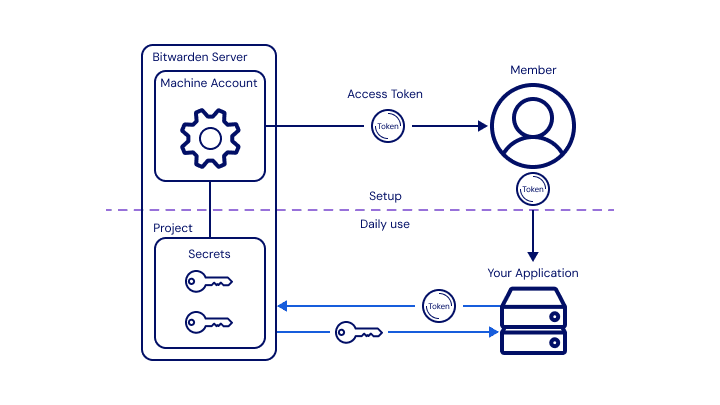
Activated Bitwarden Secrets Manager for my Account.
Added 2 Projects to organize my secrets:
personalandworkcontexts.Added Secrets to the
personalandworkprojects with the following Names and Values:NOTE
The Secret Name follows a naming pattern I explain in the below Tip. The Secret Value will be a flat
jsonobject with the key-value pairs for the environment variables I want to set.gh-pat-personal-desktop:json{ "GITHUB_OAUTH_TOKEN": "<value>" }wrk-ghe-pat-desktop:json{ "GH_ENTERPRISE_TOKEN": "<value>" }aws-iam-personal-me,wrk-aws-iam-prod-me:json{ "AWS_ACCESS_KEY_ID": "<value>", "AWS_SECRET_ACCESS_KEY": "<value>", "AWS_DEFAULT_REGION": "<value>" }TIP: I use the following naming convention for secrets:
bash<company?>-<platform>-<account-type>-<account>-<name> # Examples: # gh-pat-personal-desktop # wrk-ghe-pat-desktop # wrk-aws-iam-prod-me # wrk-aws-iam-dev-me- An optional company context prefix (
wrkor<client>) - Platform (
aws,gh, etc.) - Account Type (
iamorrootfor AWS,patfor a Github Personal Access Token, etc.) - Environment (
dev,stage,prod) - User Identity or token name (
me,desktoporservice-account).
- An optional company context prefix (
Added a Machine account for myself called
personal, which hasCan readpermissions to both projects. This account will be used to authenticate with Bitwarden Secrets Manager from my development environment, so I created an access token calleddesktopas well.
Environment Setup
Bitwarden Secrets Manager CLI
Install the Bitwarden Secrets Manager CLI - see Releases. Since I use asdf, I installed with the following:
bashasdf plugin add bitwarden-secrets-manager asdf install bitwarden-secrets-manager latest asdf global bitwarden-secrets-manager latestAuthenticate with the Bitwarden Secrets Manager using the
desktopmachine account access token. Add the following to your shell profile (e.g.,.bashrc,.zshrc, etc.):bashexport BWS_ACCESS_TOKEN=<machine_account_access_token>Verify the Bitwarden Secrets Manager CLI is working by running:
bashbws project list
Shell Integration
I added the following aliases and a couple key bash functions to my dotfiles to make it easier to retrieve secrets and set them as environment variables:
# Add to your .bashrc, .zshrc, .dotfiles, etc.
# Bitwarden Secrets Manager
# Retrieve a secret from Bitwarden Secrets Manager, parse the value as JSON,
# and export the key-value pairs as environment variables.
# Usage: bws_env <secret_uuid>
function bws_env {
local -r id="$1"
local -r value="$(bws secret get "$id" | jq -r '.value')"
# Ensure the value is a JSON object with at least one key
if [[ "$(echo "$value" | jq -r 'type')" != "object" ]] || [[ -z "$(echo "$value" | jq -r 'keys | length')" ]]; then
echo "Error: Value is not a JSON object or is empty"
return 1
fi
# Export each key as an environment variable
while IFS= read -r key; do
local value_key="$(echo "$value" | jq -r --arg key "$key" '.[$key]')"
export "$key"="$value_key"
done < <(echo "$value" | jq -r 'keys[]')
}
# AWS
function env-aws-clear {
unset AWS_SECRET_KEY AWS_MFA_ARN AWS_SECRET_ACCESS_KEY \
AWS_ACCESS_KEY_ID AWS_SESSION_TOKEN;
}# Add to your .bashrc, .zshrc, .dotfiles, etc.
# Bitwarden Secrets Manager Aliases
alias env-gh="bws_env <secret_uuid>"
alias env-ghe="bws_env <secret_uuid>"
alias env-aws-personal="env-aws-clear; bws_env <secret_uuid>"
alias env-aws-wrk-dev="env-aws-clear; bws_env <secret_uuid>"
alias env-aws-clientA="env-aws-clear; bws_env <secret_uuid>"NOTE
Replace <secret_uuid> with the UUID of the secret you want to retrieve from Bitwarden Secrets Manager.
Verify the aliases are working by running:
❯ env-gh
❯ printenv | grep GITHUB_OAUTH_TOKEN
GITHUB_OAUTH_TOKEN=<sensitive>Bonus: Direnv Integration
I use direnv to automatically load environment variables from .envrc files in my project directories. I added the following to my .envrc files to load secrets from Bitwarden Secrets Manager when I cd into a project directory:
echo "Loading Bitwarden Secrets Manager Environment Variables...";
source "$HOME/.dotfiles/bash/bw_aliases"
bws_env "<secret_uuid>"
echo "✔ Success"