If you are running a home server or managing multiple containers, you already know the struggle. A service silently goes down, and suddenly you are scrambling through terminal screens, digging through endless lines of text just to figure out what happened. I used to play that wandering game too - until I found Dozzle. Dozzle is a brilliant, lightweight web dashboard that gives you instant access to all your container logs and metrics. But the real game-changer? I configured it to automatically alert my Discord the second something goes wrong. No more wandering. Here is how this simple tool completely transformed how I monitor my home servers.
What is Dozzle?
So, what exactly is Dozzle? In the simplest terms, it is a lightweight, real-time web viewer for your container logs. If you have ever felt overwhelmed by the idea of setting up a massive, complex logging stack with heavy databases just to see what your home server is doing, Dozzle is the breath of fresh air you have been looking for.
Instead of storing logs in a giant, resource-hungry database, Dozzle hooks directly into your container engine. It streams the live logs and stats straight to your web browser. It is incredibly fast, shockingly lightweight, and doesn't eat up the precious CPU and memory you'd rather save for your actual applications.
The Magic of Alerts
Having a clean dashboard is great, but the real magic happens when you don't even have to look at it. While I already use Uptime Kuma to tell me if a service has completely crashed, Dozzle fills a crucial gap: it catches the internal errors before they take the whole system down. Dozzle lets you set up incredibly specific automated alerts based on your logs and container metrics, pinging you the second something goes wrong under the hood.
Take a look at my configuration:
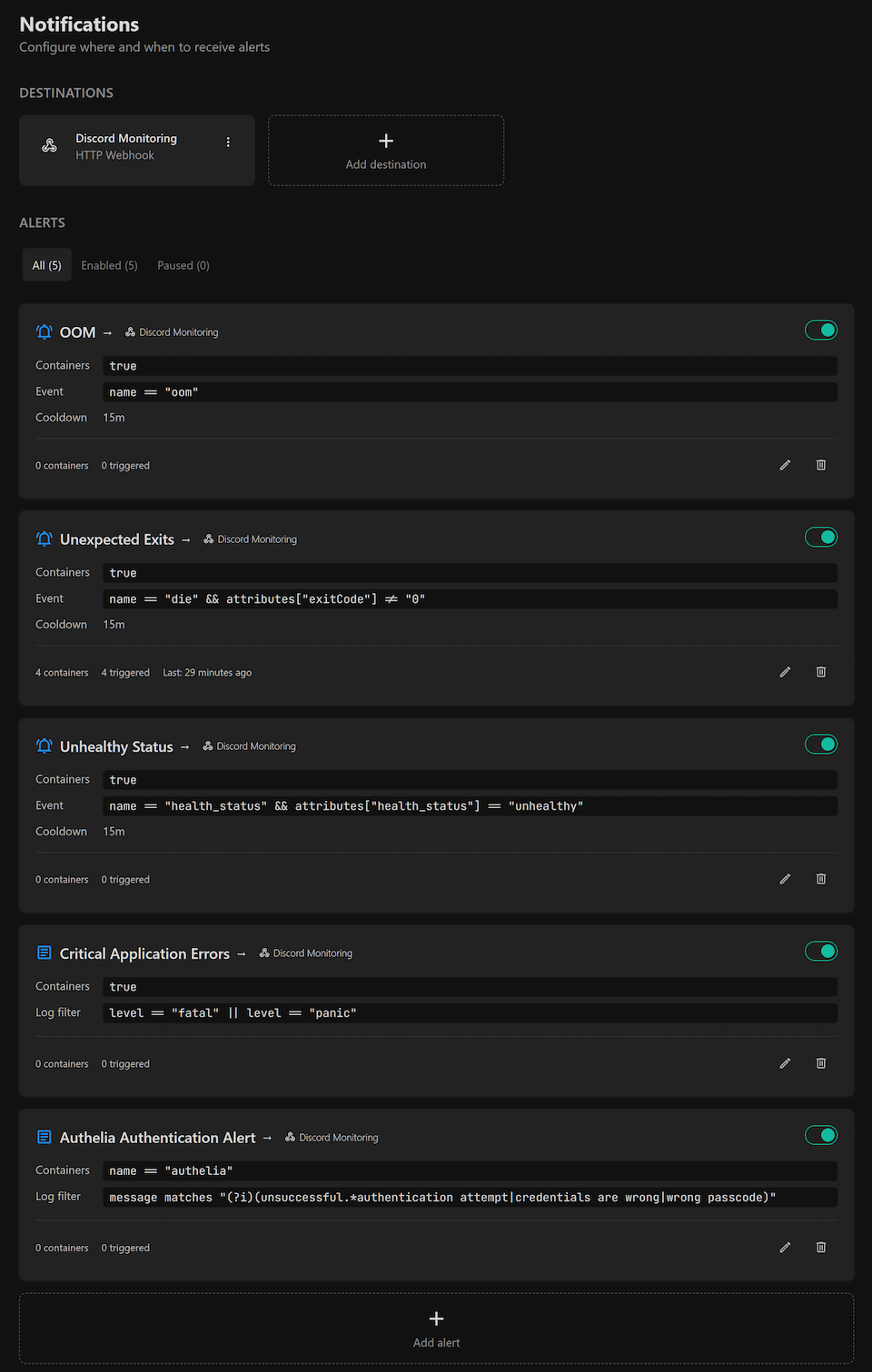
I have set up a few critical triggers that route directly to my Discord via webhooks. For instance, the "Unhealthy Status" and "Critical Application Errors" alerts are lifesavers. A container might still technically be "up" and responding to Uptime Kuma, but Dozzle catches the internal Docker health check failing or a "fatal" panic in the logs, telling me instantly that something is wrong.
I also keep a close eye on OOM (Out of Memory) events. When you are running resource-intensive services, keeping an eye on memory limits is crucial. If a container gets too greedy and gets killed by the system, I get an immediate notification.
Beyond just crashes, log monitoring gives you incredible peace of mind about your network's perimeter. If you run any kind of authentication container to protect your services, you can easily set up a simple log filter in Dozzle to track failed login attempts. If someone or something is repeatedly trying to guess a passcode, you'll be alerted. Uptime Kuma might tell you your login page is online, but Dozzle lets you know if someone is actively knocking at the front door, keeping you in the loop without you ever having to manually check the logs.
The Setup and Dashboard
Getting Dozzle up and running is ridiculously easy. For most people, it takes a single docker run command, and you are instantly looking at your logs in the browser.
Once you are in the dashboard, the search functionality is a game-changer. You don't need to learn a complicated query language. You just use the split-screen view, type in the error you are looking for, and Dozzle highlights the exact lines across your containers in real-time. It turns troubleshooting from a tedious chore into a quick, painless search.
Checkout their "Getting Started" guide for the full setup instructions.
Conclusion
At the end of the day, managing a home server should be fun, not a second job. Adding Dozzle to my stack has saved me time from digging through terminal windows and hunting for why a container suddenly exited. It is simple, it is fast, and the Discord alerts mean I can relax knowing my server will tell me if it needs attention.
If you are currently managing your containers without a dedicated log viewer, I highly encourage you to give Dozzle a try. It takes five minutes to set up, and it might just be the best upgrade you make to your server this year!