In modern cloud security, the principle of least privilege is paramount: every application should only have the permissions it needs, for the shortest time necessary. For a long time, achieving this for pods running in Amazon EKS was a challenge that often led to overly broad permissions or complex credential management.
To understand the elegant solution, let's step away from the technical details for a moment.
Imagine your application, running in a pod inside your EKS cluster, is a Traveler. Its mission is to enter the secure "nation" of AWS to perform a specific task, like retrieving a secret from Secrets Manager, reading an object from an S3 bucket, or invoking a Lambda function.
The old way of granting this access was like giving the Traveler a permanent, physical master key. We would hardcode long-lived AWS access_key_id and secret_access_key directly into our application's environment. If a malicious actor ever got their hands on it, they could gain access to our AWS account and environment, and we might not know until it was too late. This approach is a significant and unnecessary security risk.
Thankfully, there's a far more secure and elegant method. Instead of a master key, our Traveler is issued a special, short-lived "passport" that is digitally signed by their "home country" (Kubernetes). The "nation" of AWS has already agreed to trust passports issued from this specific country. When the Traveler arrives at the border, they present their passport. After verifying its authenticity, they are issued a temporary access badge that only works for the specific mission they need to accomplish. This badge has a short lifespan and expires very soon after their mission is complete. This is the very essence of IAM Roles for Service Accounts (IRSA), the modern, native way to grant your applications the precise permissions they need, exactly when they need them, without ever handling a long-lived key.

This passport is a great metaphor for IRSA. In this guide, we will unpack how this "passport system" works under the hood and demonstrate a practical example with a Go application to get our own Traveler the secure credentials it needs.
The Problem with Traditional AWS Credentials in EKS
Before IRSA, developers had a few common, but flawed, patterns for giving pods AWS access. Each of these methods essentially amounts to leaving a permanent key lying around, creating significant challenges.
Hardcoding Keys in Secrets or Environment Variables
This is the most direct anti-pattern. You generate a long-lived IAM user's access_key_id and secret_access_key and save them as Kubernetes secrets, which are then mounted into your pods as environment variables.
- Security Risk: These keys represent a static, mostly permanent credential. If they are ever leaked — whether through an accidental log output, a compromised container, a developer mistakenly committing a
.envfile to a public Git repository or using it locally to test — a malicious actor has a direct, persistent entry point to your AWS account. - Operational Nightmare: Security best practices demand regular credential rotation. How do you rotate a key being used by many different services at once? It’s a painful, error-prone process that often requires coordinated deployments and risks downtime. Mostly, teams seem to simply avoid it, leaving old keys in place indefinitely.
Assigning IAM Roles to Nodes (EC2 Instance Profiles)
A slightly better approach was to assign an IAM role to the underlying EC2 nodes in the EKS cluster. Any pod running on that node could then inherit its permissions.
- Violation of Least Privilege: This pattern is a blunt instrument. Every single pod on the node—the metrics-scraper, the API backend, the caching service—gets the exact same set of permissions. If a single, low-priority pod on that node is compromised, the attacker gains the full permissions of the node's role, which is often far more than the compromised application needed.
These challenges demanded a better, cloud-native approach—one that could provide granular, temporary, and easily managed credentials directly to the applications that need them. This is precisely the problem IRSA was built to solve.
The IRSA Passport Analogy
Now that we understand the security risks of static keys, let's unpack the inner workings of IAM Roles for Service Accounts (IRSA) in EKS. Think of it as a passport process that ensures your pods can securely access AWS resources without the risks associated with static credentials. At first glance, the workflow might seem complex, but it's a logical sequence of checks and balances that ensures a secure handshake between Kubernetes and AWS.
The process of an application using IAM Roles for Service Accounts (IRSA) is like a traveler using a passport to get a visa from border control for entry into a foreign country:
Your Application Gets a Passport: When your application's pod is created, the EKS API server acts as a trusted government and issues a digital "passport"—a JSON Web Token (JWT)—to the pod. This passport is a signed document that proves its identity.
The Passport is Paired with a Visa: Your application is pre-approved for a specific "visa" by linking its service account to an IAM role. This IAM role defines the permissions it has to access AWS resources.
The Traveler Arrives at Border Control: Your application, using the AWS SDK, presents its passport (the JWT) to AWS Security Token Service (STS), which acts as the border control officer.
Border Control Verifies the Passport: AWS STS inspects the passport's digital signature and uses a trusted list of keys from the EKS OIDC provider to verify that the passport is authentic and was issued by a legitimate authority.
The Traveler Receives an Entry Stamp: Once verified, AWS STS grants your application temporary "entry stamps" in the form of security credentials. Your app can now use these credentials to access the AWS resources it's been granted permissions for.
The Technical Breakdown
Here's a more detailed breakdown of the components involved in this process:
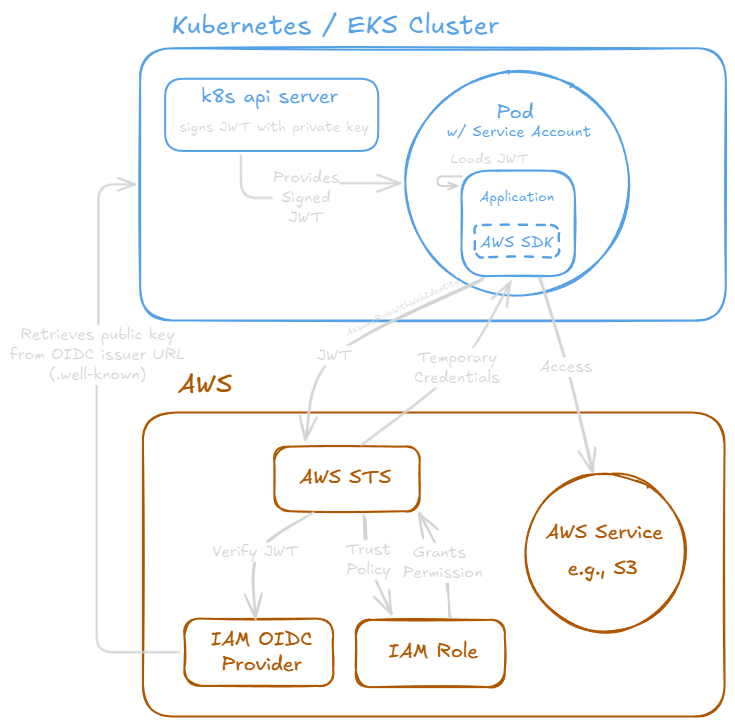
OIDC Provider Creation
First, a trust relationship must be established. You only do this once per EKS cluster. By creating an IAM OIDC Provider, you are essentially telling your AWS account: "I trust my EKS cluster. I recognize its authority to issue trusted identity documents, and I'm willing to accept them as authentic."
Technically, the EKS cluster publishes a public OIDC discovery endpoint (a URL) where IAM can find the public signing keys necessary to verify the tokens that your pods will present later. This is the foundation of the entire process—without this trust, AWS would have no reason to believe a token from your cluster is legitimate.
IAM Role Creation
Next, an IAM Role is needed that your pod will assume. This role contains two critical components:
- Permissions Policy: This defines what actions the role can perform on which AWS resources (e.g., read from a specific S3 bucket).
- Trust Policy: This is where you specify that this role can be assumed by entities presenting a valid token from your EKS cluster's OIDC provider, and you can further restrict it to a specific Kubernetes Service Account and namespace.
Here's an example of what the Trust Policy looks like. Notice how it's not trusting an AWS service or another user, but the OIDC provider:
{
  "Version": "2012-10-17",
  "Statement": [
    {
      "Effect": "Allow",
      "Principal": {
        "Federated": "arn:aws:iam::YOUR_AWS_ACCOUNT_ID:oidc-provider/oidc.eks.us-west-2.amazonaws.com/id/YOUR_OIDC_ID"
      },
      "Action": "sts:AssumeRoleWithWebIdentity",
      "Condition": {
        "StringEquals": {
          "oidc.eks.us-west-2.amazonaws.com/id/YOUR_OIDC_ID:sub": "system:serviceaccount:your-namespace:your-app-sa"
        }
      }
    }
  ]
}
The Pod's Service Account and Token
A Kubernetes service account is annotated with the ARN of the IAM role, linking the two. With IRSA configured, Kubernetes does something special: it automatically generates a unique, signed JSON Web Token (JWT) and mounts it into the pod at a specific file path (/var/run/secrets/eks.amazonaws.com/serviceaccount/token).
This token is our passport. It's an identity document, signed by the trusted OIDC provider (our "passport office"), that cryptographically proves the pod's identity, including the namespace and service account name it belongs to. It's short-lived and automatically rotated by Kubernetes, meaning the passport is only valid for a short time.
Role Assumption
When your application starts up, the AWS SDK detects that it's running in an environment with IRSA configured. Instead of looking for static credentials in environment variables, it reads the JWT from the mounted file and exchanges it with AWS STS for temporary credentials. See Use IRSA with the AWS SDK for more details.
STS then performs its "border check" - it uses the OIDC provider configuration to verify the token's signature is valid (public key). It checks the Trust Policy on the IAM Role to ensure that the identity in the token is allowed to assume the role. If everything checks out, STS grants the application temporary, short-lived AWS credentials. Your application can then use these credentials to make authorized API calls to services like S3 or DynamoDB.
Putting It All Together: A Practical Example with Go
We've covered the theory of IRSA. Now, let's see how these pieces fit together in a real-world scenario.
For a hands-on demonstration, I've created a simple Go application and a set of Kubernetes manifests bundled as a Helm chart available on GitHub: tdharris/aws-identity-validator.
This project is designed to be just a "simple" way to validate that IRSA is working. The application itself does only one thing: it uses the AWS SDK to ask, "Who am I?" and logs the response.
To see this all in action for yourself, I encourage you to clone the repository and follow the step-by-step guide in the README. It will walk you through creating these resources and deploying the application. Though, it is fairly involved, so be prepared for a bit of setup.
Skipping ahead, here's the application's logs to see the definitive proof that our setup is working:
AWS Identity Validator
===========================

[IRSA Environment Check]
✓ AWS_WEB_IDENTITY_TOKEN_FILE env var is set: /var/run/secrets/eks.amazonaws.com/serviceaccount/token
✓ Token file exists
✓ Token file size: 1246 bytes
✓ AWS_ROLE_ARN env var is set: arn:aws:iam::<account-id>:role/<role-name>

[AWS SDK v1]
✓ Successfully authenticated with AWS SDK v1
Account ID: <account-id>
User ID: <user-id>:<session-id>
ARN: arn:aws:sts::<account-id>:assumed-role/<role-name>/<session-id>
Provider: WebIdentityCredentials
Access Key ID: <access-key-id>
Using temporary credentials (has session token)

[AWS SDK v2]
✓ Successfully authenticated with AWS SDK v2
Account ID: <account-id>
User ID: <user-id>:<session-id>
ARN: arn:aws:sts::<account-id>:assumed-role/<role-name>/<session-id>
Provider: WebIdentityCredentials
Access Key ID: <access-key-id>
Using temporary credentials (has session token)
This output confirms that the application successfully authenticated with AWS using the temporary credentials provided by IRSA. It shows the account ID, user ID, and ARN of the assumed role, demonstrating that our pod is indeed acting as a trusted identity with the correct permissions.
The New Standard for EKS Security
By swapping static keys for auto-rotating, temporary credentials, IAM Roles for Service Accounts (IRSA) provides a fundamental security upgrade. It grants you granular, pod-level permissions, eliminates the risk of leaked secrets, and simplifies operations—all with clear audit trails in AWS.
You've effectively replaced the risky master key with a secure passport for every application. For any workload running in EKS, IRSA isn't just another feature; it's the modern, native, and essential way to handle identity in the cloud.
For more details on IRSA, check out the AWS EKS IAM Roles for Service Accounts and the Kubernetes Service Accounts for Pods.